Business & Tech Essentials
AI Agents vs AI Copilots vs AI Chatbots: What Is the Real Difference?
If you have been following AI developments recently, you have probably seen three terms everywhere: AI chatbots, AI copilots, and AI agents.
At first, they can look almost identical. You type something, the AI responds, and sometimes it can even perform an action. So what actually makes them different?
The easiest way to look at it is this:
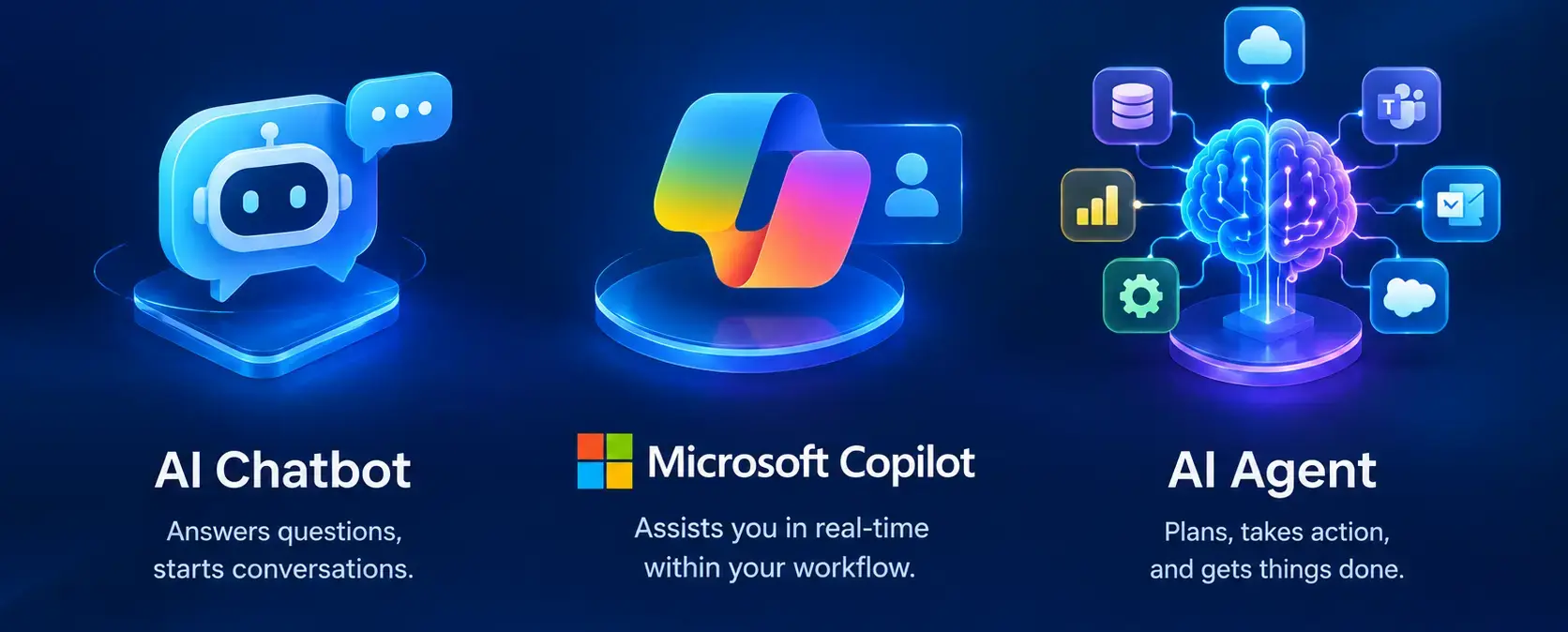
Chatbots mainly communicate, copilots assist you with work, and AI agents can take actions to complete a goal.
The difference is not simply the AI model behind them. It is mainly about what the system is expected to do, how much control the user keeps, and whether the AI can use tools and take actions outside the conversation.
Quick Comparison
|
Area |
AI Chatbot |
AI Copilot |
AI Agent |
|---|---|---|---|
|
Main purpose |
Conversation and answers |
Assist with work |
Complete a goal or task |
|
User interaction |
User asks and receives a response |
User works with AI inside an application |
User gives a goal and the agent works through it |
|
Autonomy |
Usually low |
Usually guided by the user |
Can be high |
|
External tools |
Limited or optional |
Can use connected tools |
Designed to use tools, workflows, and systems |
|
Typical example |
Customer support bot |
Microsoft 365 Copilot |
Custom agent in Copilot Studio |
|
Best fit |
FAQs and support |
Individual productivity |
Business process automation |
These categories are useful for explaining the difference, but they are not completely separate boxes. Modern AI products can combine conversational, copilot, and agent capabilities in the same solution. Microsoft, for example, supports agents that extend Copilot with knowledge, tools, and actions.
What Is an AI Chatbot?
An AI chatbot is mainly designed to communicate with users through natural language. You ask a question, explain a problem, or request information, and the chatbot generates a response.

Traditional chatbots often followed predefined conversation paths, while modern chatbots can use large language models to understand more flexible questions. The important point is that conversation is still the main job.
For example, a customer may ask:
What are your support hours?
The chatbot can answer the question immediately without requiring a member of the support team to respond.
Common Uses of AI Chatbots
- Customer support
- Frequently asked questions
- Website assistance
- Employee help desks
- Basic information requests
- Lead qualification
Advantages of AI Chatbots
- Easy for users to interact with
- Available around the clock
- Good for handling repetitive questions
- Relatively simple to deploy
- Can reduce the volume of routine support requests
Limitations of AI Chatbots
- They may stop at providing an answer
- Complex tasks may require human assistance
- Access to business systems depends on the solution
- Incorrect AI responses are still possible
So, when the primary requirement is talking to users and answering questions, a chatbot is often the right starting point.
Need a chatbot for your website or customer support process? Out2Sol Global can help you design AI chatbot solutions around your business requirements.
What Is an AI Copilot?
An AI copilot is designed to work alongside a person while they are completing a task. Instead of replacing the user's workflow, it provides assistance within that workflow.
Microsoft 365 Copilot is a good example. It works inside applications such as Word, Excel, Outlook, and Teams and can help users with tasks such as drafting content, summarizing information, and working with business context.

Think about an employee preparing a monthly report. Instead of creating everything from scratch, the employee can ask Copilot to summarize information, draft content, or help analyze the data, while the employee remains involved in the final work.
Common Uses of AI Copilots
- Writing and document creation
- Meeting and email summaries
- Data analysis
- Coding assistance
- Report preparation
- Research support
Advantages of AI Copilots
- Works inside the user's normal workflow
- Reduces repetitive work
- Provides contextual assistance
- Helps users complete tasks faster
- Keeps the user involved in decisions
Limitations of AI Copilots
- Users still need to review AI output
- Capabilities depend on the application and available data
- They may not be suitable for fully automated processes
- Poor data or unclear instructions can reduce the quality of results
This is why I usually think of a copilot as an assistant sitting beside the employee, rather than a digital worker operating completely on its own.
Planning to introduce AI copilots for your employees? Out2Sol Global can help you design and implement AI copilot solutions that fit your existing Microsoft environment.
What Is an AI Agent?
An AI agent goes a step further.
An agent can understand a goal, use connected knowledge and tools, decide what action to take, and complete multiple steps toward that goal. Microsoft describes agents as AI systems that can reason through requests, use knowledge and tools, and in some scenarios operate autonomously based on defined instructions and guardrails.

For example, imagine an IT support agent receives a request saying:
My laptop cannot connect to the company network.
A simple chatbot might explain troubleshooting steps.
A copilot might help the IT employee investigate the issue.
An agent could potentially check the relevant system, gather information, create or update a support ticket, and route the issue to the correct team using connected tools and workflows.
That is where agentic AI becomes much more interesting for business processes.
Common Uses of AI Agents
- IT service management
- Customer support workflows
- Sales operations
- Employee onboarding
- Invoice and document processing
- CRM updates
- Multi-step business automation
Advantages of AI Agents
- Can handle multi-step processes
- Can connect with business systems
- Can work with tools and workflows
- Can operate with less human involvement
- Can respond to events and complete tasks based on defined instructions
Limitations of AI Agents
- More difficult to design correctly
- Require stronger security and governance
- Need carefully defined permissions
- Can create greater business risk if given excessive access
- Important actions may still require human approval
Microsoft specifically recommends defining clear boundaries, limiting permissions, testing agents carefully, and keeping human oversight for sensitive or high-impact actions.
Looking to automate multi-step business processes with custom AI agents? Out2Sol Global can help you build AI agent solutions with the right workflows, integrations, and security controls.
The Real Difference Between Them
The easiest way to understand the difference is to look at the job each system is expected to perform.
Chatbot
You ask:
What is the status of my order?
The system responds with information.
Copilot
You ask:
Summarize the sales report and prepare talking points for my meeting.
The system helps you complete the work.
AI Agent
You ask:
Review today's delayed orders, identify the reasons, contact the responsible teams, and update the relevant records.
The system can work through a multi-step process using available tools and permissions.
That is the important distinction.
Autonomy and Human Control
Autonomy is one of the clearest ways to compare the three.
A chatbot normally waits for the user to ask something.
A copilot usually works alongside the user and provides assistance within the current task.
An agent can be designed to continue working through a process with less direct intervention. In Microsoft Copilot Studio, autonomous agents can react to events, make decisions, and execute actions according to their instructions and guardrails.
This does not mean every agent should operate without humans.
For important business actions, human approval can still be built into the process. Microsoft also recommends human oversight and least-privilege access for higher-risk agent scenarios.
Which One Does Your Business Need?
There is no single answer for every organization.
Choose an AI Chatbot When
You mainly need to:
- Answer customer questions
- Provide FAQs
- Handle basic support
- Guide users to information
Choose an AI Copilot When
Your employees need help with:
- Documents
- Emails
- Data analysis
- Meetings
- Coding
- Daily productivity tasks
Choose an AI Agent When
You want to:
- Automate several steps
- Connect different business systems
- Trigger actions automatically
- Process requests from start to finish
- Build a digital workflow around a specific business goal
Microsoft also recommends choosing the platform based on factors such as audience, functionality, deployment scope, and governance requirements. For simpler agents, Microsoft 365 Copilot Agent Builder may be enough, while broader integrations and more complex workflows may be better suited to Copilot Studio.
What About Copilot Studio?
This is where the three concepts can start to overlap.
Copilot Studio is a low-code platform for creating agents and agent flows. These solutions can use knowledge sources, connectors, workflows, and tools to interact with other systems.
For example, a business could create an agent that:
- Answers employee questions
- Searches internal SharePoint information
- Checks a business system
- Starts a workflow
- Requests human approval
- Updates another system
So the technology does not always fit into one simple category. A solution may begin as a conversational assistant and later gain tools, workflows, and actions that make it much closer to an agent.
A Simple Business Example
Let's take one common scenario: employee leave requests.
Chatbot Approach
An employee asks:
How many annual leave days do I have?
The chatbot provides the answer.
Copilot Approach
The employee asks:
Help me prepare my leave request for next month.
The copilot assists with the request and guides the employee.
Agent Approach
The employee says:
Request five days of leave next month and send it for manager approval.
The agent could potentially check availability, prepare the request, send it through an approval workflow, and update the relevant system if the request is approved.
The difference is not just the quality of the conversation.
It is the amount of work the AI can actually carry out.
Security and Governance Matter More as Autonomy Increases
As AI moves from answering questions to taking actions, security becomes much more important.
A chatbot that only answers public FAQs has a very different risk profile from an agent that can write information into a CRM or process financial transactions.
Before deploying an AI agent, organizations should think about:
- What data can it access?
- Which systems can it connect to?
- What actions can it perform?
- Which actions require approval?
- What happens when the agent makes a mistake?
- How are activities monitored and audited?
Microsoft recommends least-privilege access, defined boundaries, testing, and human oversight for sensitive activities.
Final Thoughts
AI chatbots, copilots, and agents are not simply three different names for the same technology.
A chatbot is mainly focused on conversation.
A copilot is focused on assisting a person with work.
An AI agent is focused on achieving a goal through actions, tools, and workflows.
The right choice depends on what you actually want the AI to do. If you only need answers, a chatbot may be enough. If your employees need help during their daily work, a copilot can be more appropriate. If you want to automate a complete business process across multiple systems, an AI agent may be the better fit.
The interesting part is that these technologies are increasingly connected. As organizations move from simple conversations toward AI powered workflows, the real question is no longer just "Which AI should we use?" It is "How much responsibility should we give the AI, and where should a human remain in control?"
Disclaimer: All logos, trademarks, and brand names used in this document are the property of their respective owners. Their use here is for identification purposes only and does not imply endorsement.
Recent News
How to Set Default General Product Posting Groups in Dynamics 365 Business Central
08-09-2026

How to Apply Sensitivity Labels in Power BI for Data Protection
08-09-2026

LEAP 2026 Day 4 Highlights: $15B in Total Investments & The Human Capital Era
04-09-2026

LEAP 2026 Day 3 Highlights: $857M in Tech Deals, VC Growth & Local Manufacturing
03-09-2026

LEAP 2026 Day 2 Highlights: More Than $2.5 Billion Invested to Boost Saudi Arabia's Data Hubs and Digital Capabilities
02-09-2026

LEAP 2026 Day 1 Highlights: $15B+ Investments & 5 Enterprise Tech Trends
01-09-2026
How to Assign Workspace Roles and Permissions in Power BI Service
25-08-2026
How to Set Default Document Line Types in Dynamics 365 Business Central
25-08-2026
How to Create a List Page in Business Central Using AZ AL Dev Tools
19-08-2026
How to Connect Azure SQL Database to Power BI Desktop
19-08-2026

Your choice regarding cookies on this site
Policy, By Continuing, You are agreeing to Our Terms of Use and Consenting to the above.
Privacy Policy Powered By |